
WareCue
LIVE EVENTS · ATTRACTIONS · INTERACTIVE

Multi-output media playback and show control.

Build cue stacks, play different content across each output, route audio independently and control the rest of the show from one place. For Windows and macOS.

4 VIDEO OUTPUTS4 AUDIO OUTPUTSHTTPWEBSOCKETOSCTCP/IPMIDI

Free sign-up · No card required · No time limit · Trial outputs are watermarked
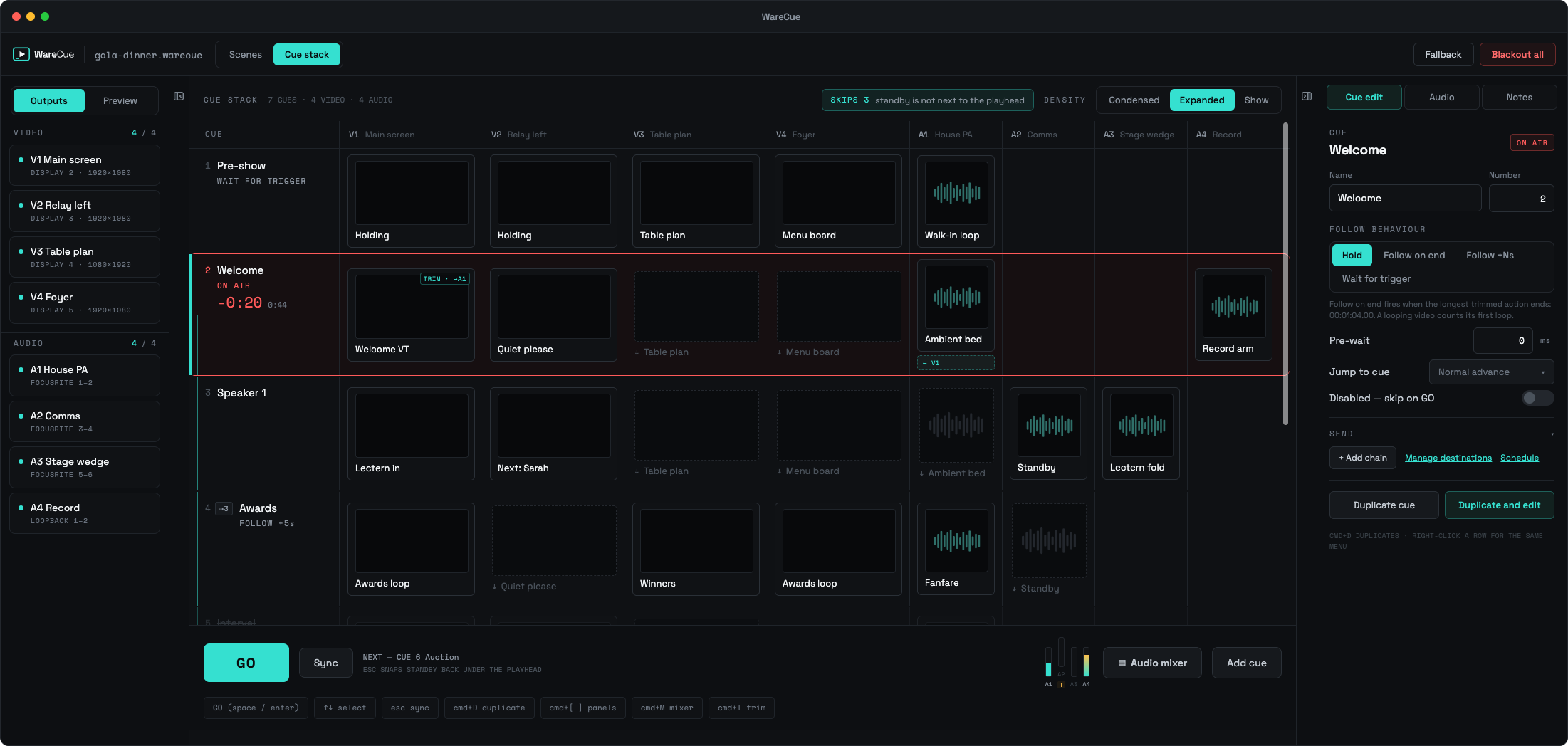
WareCue cue stack showing four video and four audio outputs across each cue
CUE STACK

See the whole show before you press GO.

Each cue represents one moment in the show. Video, audio and external actions sit across the same row, so you can see exactly what every output will do before firing the cue.

CUE
V1
V2
V3
V4
A1
A2
SENDS
3Walk-on
Holding
Brand loop
↓ hold
Timer
Walk-on music
—
OSC
4Product reveal
Opening VT
Brand loop
Logo
Timer
Music
Sting
OSC + HTTP
5Q&A
Camera
↓ hold
Logo
Notes
fade
—
MIDI

One cue. Every output. Every action.

SCENE VIEW

Build what each screen plays.

Scenes make individual outputs easy to build and manage. Drop in video, images, audio and other supported sources, position them where you want them and play them individually, layered together or as a sequence.
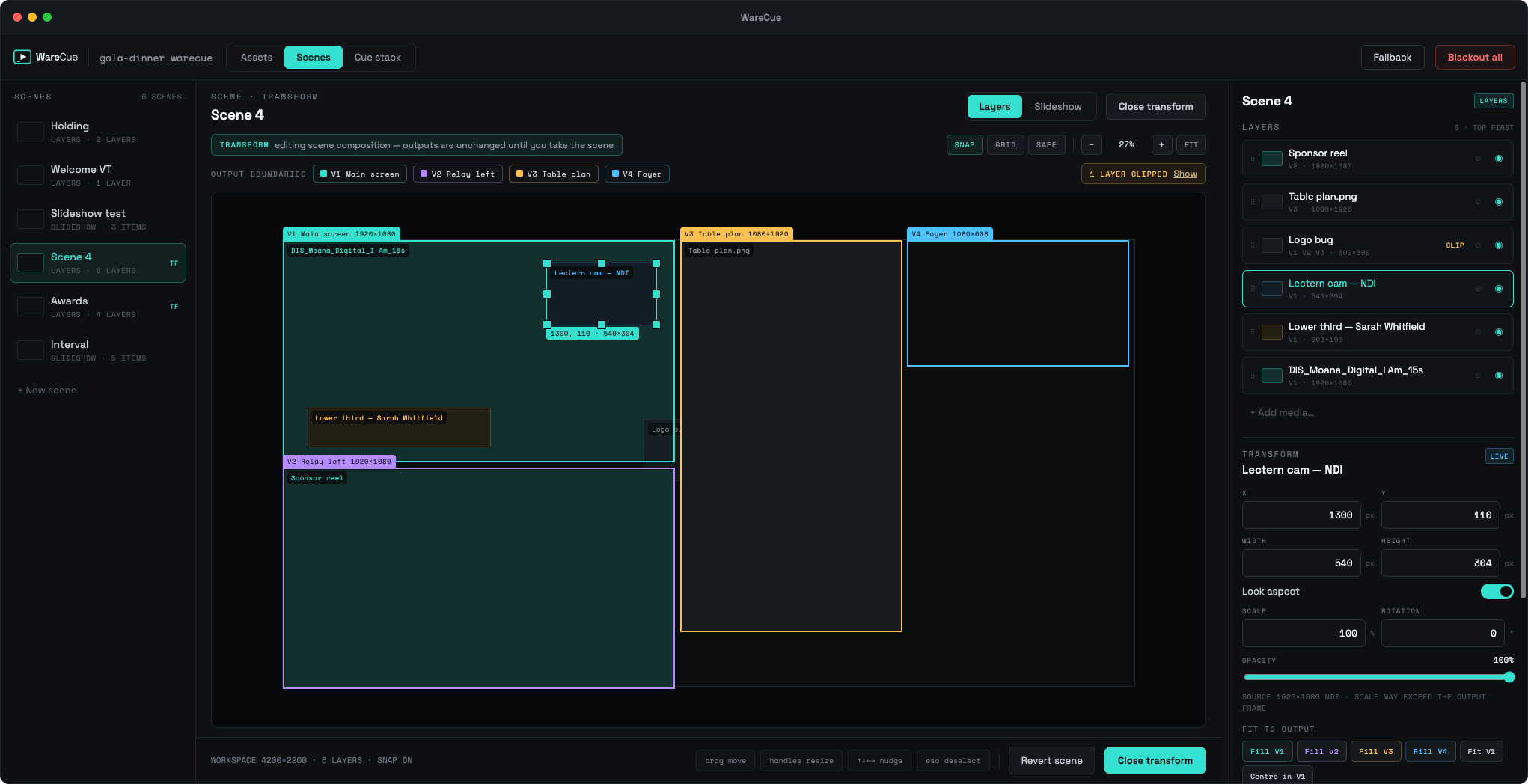
WareCue scene view showing layers positioned against four output boundaries
LAYERED SCENESCombine sources into one outputStack several sources into a single screen and position each one where you want it.
Background video
Logo
Text
Camera or source layer
Overlay graphics
SLIDESHOW / STACK PLAYBACKAn ordered sequence of mediaBuild a collection that advances through a sequence without creating an individual cue for every item.
Ordered media list
Advance on end or on time
Loop the sequence
Mixed video and images
Fires from a single cue

Use a Scene for a single piece of media, a layered composition or a stack of content that plays in sequence.

ASSET LIBRARY

Import once. Use it throughout the show.

Keep videos, audio, images and show media organised in one place. Preview assets, trim them, adjust playback settings and reuse them across scenes and cues without importing the same file repeatedly.
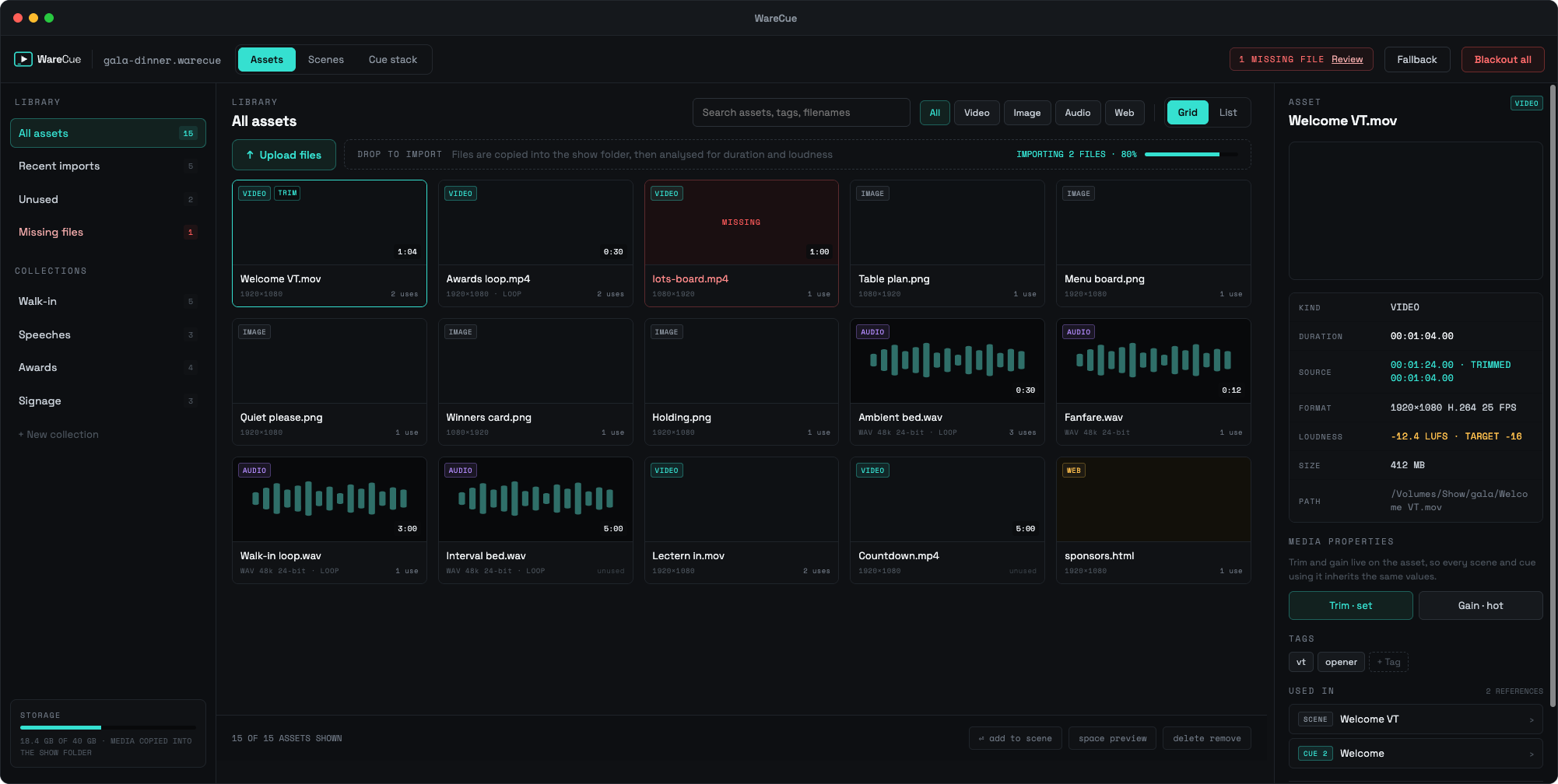
WareCue asset library listing show media with format, loudness and usage
Central show media library
Preview media before use
Media trim
Gain and audio settings
Reuse assets across multiple scenes
Replace an asset without rebuilding the show
Clear media organisation
GLOBAL COLLECTIONS

The media you use on every show.

Keep frequently used media available across every WareCue project. Company idents, walk-in music, test files, holding graphics, sponsor assets and stings can live in Global Collections instead of being imported into every new show.

GLOBAL COLLECTIONSAVAILABLE IN EVERY PROJECT ON THIS MACHINE
Company Assets
3 ITEMS
Logo Sting0:04
Holding SlidePNG
Walk-in Loop3:00
Test Media
3 ITEMS
1080p Test0:30
Audio Left / Right0:20
Sync Test0:15
Show Stings
3 ITEMS
Awards Sting0:06
Winner Sting0:05
Transition Sting0:02

Build your toolkit once. Take it into every show.

SOURCES

What a Scene can play.

Drop any of these into a Scene on its own, layer several together or run them as a sequence.

Video
H.264 · HAP · PRORES
Image
PNG · JPG · WEBP
Audio
WAV · MP3 · AAC
Video Capture
CAPTURE CARDS · HDMI IN
Camera
USB · BUILT-IN
Web Pages
LIVE AND INTERACTIVE
NDI
COMING SOON
Show Timers
OVERLAY OR FULLSCREEN
External Trigger
HTTP · WS · OSC · TCP · MIDI
LAYERED SCENESSEQUENTIAL STACKSLOOPSHOLD STATESPLAYBACK CONTROLS
MULTI-OUTPUT

Four screens. Four different jobs.

Run different content on each connected display from the same show. Your main screen can play a video while another holds a sponsor graphic, another carries presenter information and another waits on a holding scene.

Opening VT
OUTPUT 1Main LED1920 × 1080 · LANDSCAPE
Brand Loop
OUTPUT 2Stage Left1920 × 1080 · LANDSCAPE
Camera / Presentation
OUTPUT 3Stage Right1080 × 1920 · PORTRAIT
Timer + Presenter Notes
OUTPUT 4Confidence1920 × 1080 · OPERATOR VIEW

Different media. Different resolutions. Different orientations. One cue stack.

Need more than four? WareCue Nodes extend the same show onto another Mac or PC over LAN, adding another four video and four audio outputs per Node.

CONTROL

Control WareCue from anything. Trigger anything from WareCue.

WareCue can sit inside the rest of the show rather than becoming another isolated playback application. Trigger cues externally and send commands to other systems from inside the same cue.

INCOMINGSomething else triggers WareCue
HTTPWebSocketOSCTCP/IPMIDI
App button triggers a video
Game system fires a cue
Sensor starts an attraction sequence
MIDI triggers playback
OUTGOINGA cue triggers something else
HTTPWebSocketOSCTCP/IPMIDI
WareCue sends OSC to lighting
WareCue sends HTTP to another application
TCP/IP command controls an AV device
MIDI note fires a downstream system
REDUNDANCY

Every Master licence includes a backup.

A WareCue Master licence includes two Master activations for the same show — giving you an active machine and a standby machine without buying another licence.

MASTER AACTIVERuns the show. Holds the playhead and drives every output.
MASTER BSTANDBYSame show file, same Nodes, licensed by the same Master key.
↓ SAME SHOW FILE · SAME NODES

Because the show should not stop when a computer does.

The two machines pair over the network and stay on the same show, with a heartbeat keeping their roles in sync. WareCue coordinates the takeover; the cut between them is made by your AB switcher.

WARECUE NODESCOMING SOON

Gain outputs with nodes. All running the same show.

WareCue Nodes extend the same cue stack across additional Macs or PCs on the LAN. Each Node adds another four video and four audio outputs without creating another show for the operator to manage.

MASTER
WareCue MasterThe machine with the GO button.
4 VIDEO + 4 AUDIO
NODE 1
WareCue NodeFollows the Master over LAN.
+4 VIDEO +4 AUDIO
NODE 2
WareCue NodeFollows the Master over LAN.
+4 VIDEO +4 AUDIO

One cue stack. One GO button. Outputs across multiple machines.

THE RULE
Following another WareCue = Node. Running its own show = Master.
NODE → MASTER
Need the Node to run an independent show later? Upgrade it to Master and only pay the difference.

Built for shows that need more than Play.

LIVE EVENTSAwards, conferences, launches, presentations and corporate productions.
ATTRACTIONSTimed experiences, museums, immersive rooms and interactive attractions.
INTERACTIVE PLAYBACKLet apps, sensors, buttons or other systems trigger media and show cues.
MULTI-SCREEN SHOWSRun different content across independent outputs from one operator interface.
TRY FIRSTNo card, no time limitSign up, download Trial Mode and build a real show before you buy. No payment details, no trial clock — the programme outputs are simply watermarked until you licence the machine.
OFFLINEThe show machine does not need the internetLicence keys are signed and verify locally. A machine bolted into a rack with no outbound network activates exactly like a laptop.
YOUR MEDIAYour files stay on your machinesWareCue copies media into your show folder and reads it from there. Show media is never uploaded to us.
FAILSAFE LICENSINGLicensing never interrupts a running showIf a subscription expires, WareCue does not interrupt playback. Licensing changes take effect at a later launch, never halfway through an event.

Build the show. Press GO.

Download WareCue and build a real show before deciding whether to buy it. Trial Mode has no time limit — only the programme outputs are watermarked.

WINDOWS + MACOS · FREE SIGN-UP · NO CARD REQUIRED